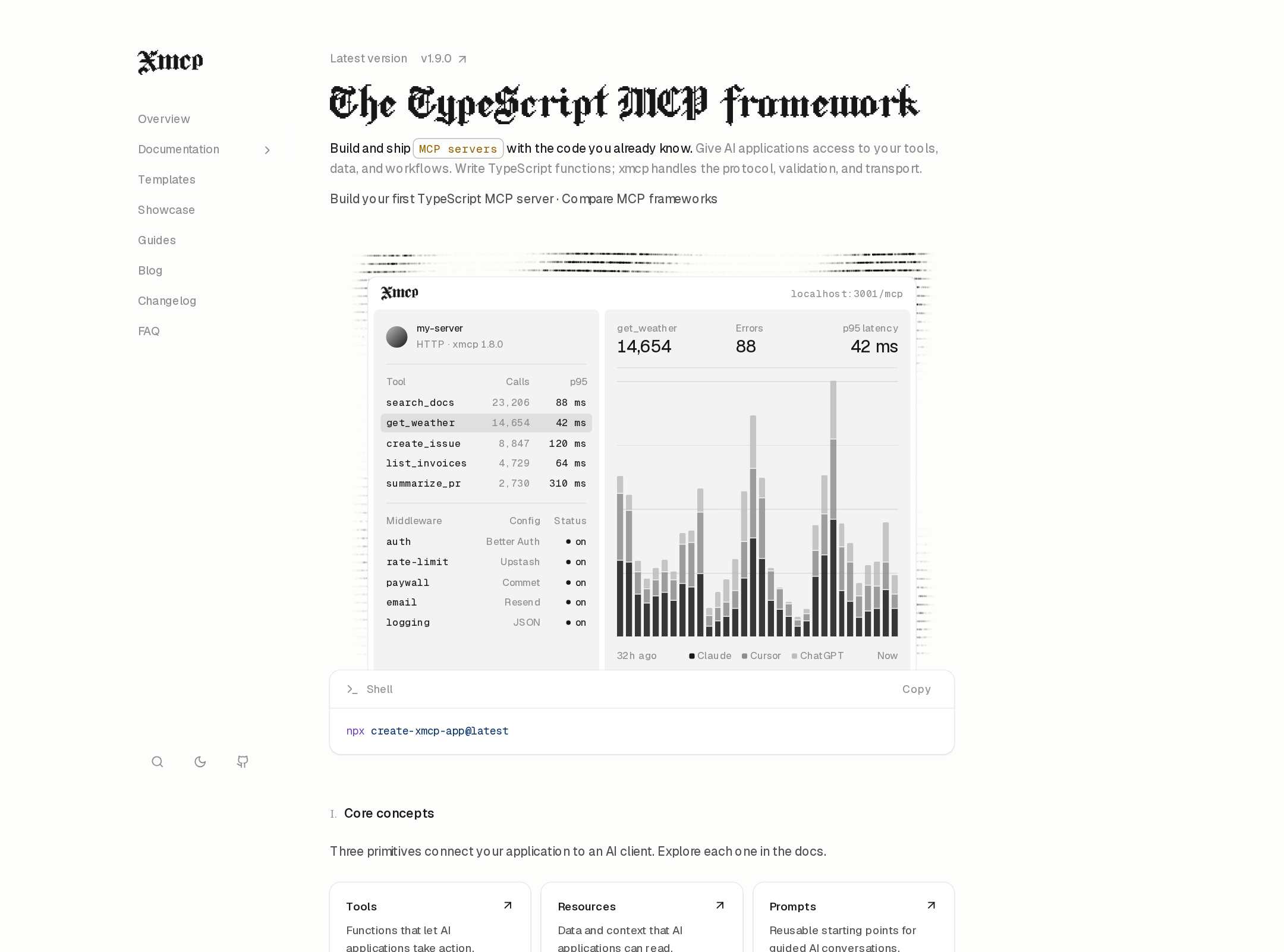


xmcp website analysis
A detailed critique of the homepage's craft, originality, usability, and ability to move visitors toward its intended goal.
Our observations
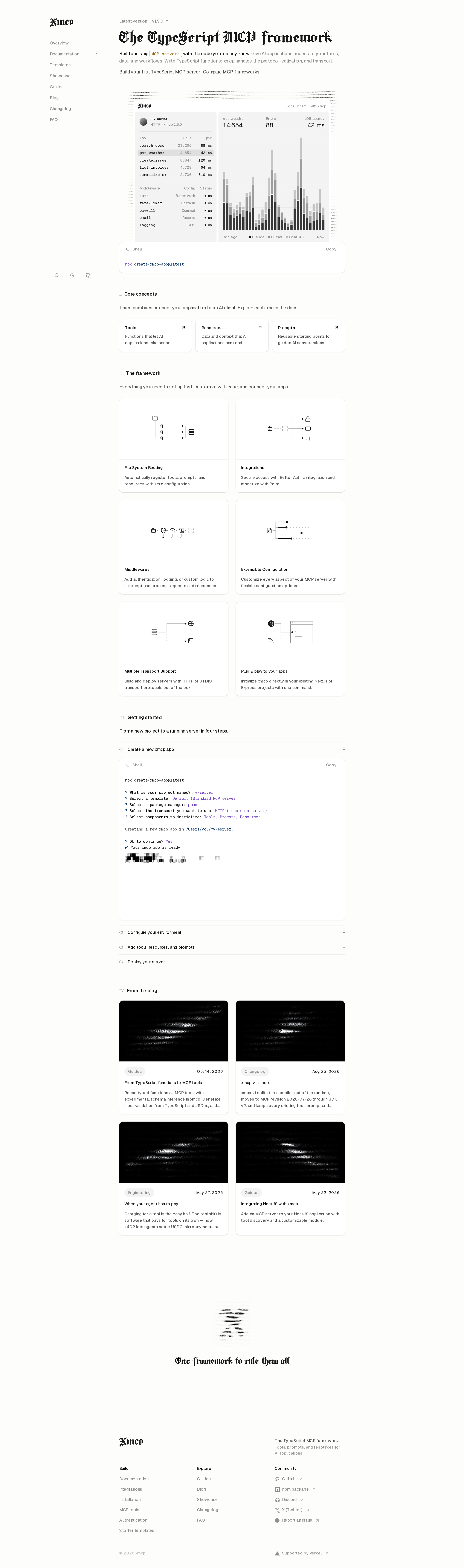
A highly distinctive and well-structured developer-tool homepage with strong editorial character. It is suitable for publication, with accessibility and small-scale legibility as the principal areas requiring attention.
Best practices
The page has a clear document structure, one detected H1, no heading skips, one main landmark, semantic navigation and footer regions, and practical code-copy controls. The reported contrast failures are a meaningful quality issue.
What works
- Clear progression from product definition to concepts, capabilities, setup, and supporting content.
- One H1, logical heading levels, and a single main landmark are present in the supplied evidence.
- Code examples include copy controls, which is appropriate for a developer-facing framework.
- Navigation, footer, feature, and content regions are semantically recognizable.
Opportunities
- Resolve the 42 reported text-contrast failures, especially in navigation and documentation controls.
- Validate keyboard focus visibility, hover and active states, and accessible names for icon-only utilities.
- Check small labels and code-adjacent text at zoom and on narrow screens; the screenshot suggests a generally compact typographic scale.
- Test the canvas and transition behavior with reduced motion enabled; automated evidence confirms motion-related elements but not their accessibility behavior.
Design
The design is unusually coherent and memorable for a technical framework site. Its editorial typography, monochrome restraint, diagrams, and disciplined card system create a recognizable point of view.
What works
- The blackletter-influenced masthead gives the project a strong identity without relying on a saturated color palette.
- Product visualization, diagrams, code blocks, and cards all reinforce the technical subject matter.
- Repeated spacing, thin borders, modest radii, and shallow shadows create a consistent component language.
- The long-form sequence feels deliberately edited rather than assembled from generic marketing sections.
Opportunities
- Increase the visual prominence of the primary onboarding action relative to secondary links and utilities.
- Reduce the amount of empty lateral space or widen selected content areas where additional readability would help.
- Ensure display typography remains legible at smaller viewport sizes and under user font scaling.
Uniqueness
The combination of literary editorial styling and developer documentation is highly differentiated. The homepage avoids the familiar gradient-heavy or dashboard-only visual patterns common in developer-tool marketing.
What works
- The contrast between historic display typography and modern TypeScript tooling is distinctive and conceptually appropriate.
- Technical diagrams and interface mockups make the product feel concrete without resorting to stock imagery.
- The page has a recognizable visual rhythm across concepts, feature cards, setup content, and articles.
Opportunities
- Extend the distinctive editorial voice into interaction states and documentation wayfinding without making controls less discoverable.
- Use the visual identity consistently across social previews, documentation surfaces, and package-facing touchpoints if those are part of the broader product system.
User experience
The information architecture is strong for technical visitors, but the compact type, low-contrast secondary text, and narrow content presentation may slow scanning and make orientation less comfortable.
What works
- The page answers what xmcp is, what it supports, and how to begin in a sensible order.
- Core concepts and framework capabilities are separated into understandable sections.
- The getting-started area provides an immediately actionable code path rather than only describing features.
- Search, theme switching, documentation, and repository access are available from the persistent header.
Opportunities
- Make the first onboarding action more visually explicit and easier to identify at a glance.
- Improve contrast and size for navigation, metadata, and supporting descriptions.
- Consider stronger section anchors or persistent progress cues for the long page.
- Verify the two-column feature and article grids collapse cleanly without creating overly narrow cards or dense text.
Conversion optimization
For a framework homepage, conversion means moving a developer from recognition to documentation, installation, and first successful server. The page supports that journey well through code and setup content, but the primary next step is not especially forceful.
What works
- The hero states the category clearly: a TypeScript MCP framework.
- A visible code specimen and later getting-started sequence reduce the distance to first use.
- Feature cards communicate concrete framework capabilities such as routing, integrations, middleware, and transports.
- Blog content provides useful secondary paths for visitors who need context or proof of activity.
Opportunities
- Promote a single primary action such as Start building or Read the documentation near the hero title.
- Add concise installation or package-manager context adjacent to the first code example.
- Clarify the relationship between the hero code sample, the documentation link, and the getting-started sequence.
- Use project signals such as repository activity, compatibility information, or concise adoption context if substantiated by the product team.
What we'd improve
- 01high
Fix secondary-text contrast
Address the reported 42 contrast failures in navigation, documentation controls, metadata, and other muted labels. Preserve the editorial restraint with darker neutrals or stronger state differentiation rather than relying on very light gray text.
- 02high
Strengthen the primary onboarding path
Place one clearly dominant documentation or starter action beside the hero promise, then connect it directly to the first runnable example. Keep comparison and exploratory links visually secondary.
- 03high
Audit responsive legibility
Review the narrow rail, small labels, code blocks, feature cards, and two-column grids at mobile widths and increased text scaling. Confirm that navigation and code remain readable without horizontal loss or excessive compression.
- 04medium
Improve interaction feedback
Verify visible keyboard focus, hover, pressed, and expanded states for navigation, copy buttons, theme controls, cards, and setup disclosures. Ensure the understated visual language does not hide actionable state changes.
- 05medium
Add stronger wayfinding on the long page
Consider persistent section context, clearer anchor treatment, or a compact contents affordance so visitors can move efficiently between concepts, capabilities, setup, and articles.
- 06low
Use the editorial identity to support trust
If available and accurate, introduce concise technical proof points near the framework overview, such as supported transports, runtime expectations, or repository signals, without disrupting the quiet composition.