timespent website analysis
A detailed critique of the homepage's craft, originality, usability, and ability to move visitors toward its intended goal.
Our observations
A distinctive and commercially focused app landing page with excellent visual direction and strong product storytelling. Its main opportunities are accessibility, interaction discoverability, and sharper prioritization of the product’s broad use cases.
Best practices
The page has one clear hero heading, a logical section sequence, prominent download actions, testimonials, FAQs, and a semantic-looking navigation structure. The supplied audit reports a solid overall accessibility score but also identifies serious contrast issues.
What works
- The primary download action is visible in both the navigation and hero.
- The page includes product explanation, use cases, social proof, FAQs, and footer navigation.
- The supplied structure reports one H1, one main region, and no heading skips.
- The hero includes controls for changing and pausing the showcased product imagery.
Opportunities
- Resolve the 13 reported serious text-contrast failures, especially in colorful use-case and testimonial cards.
- Make horizontal galleries visibly discoverable and usable with keyboard and assistive technology.
- Review small supporting text and dense screenshots at narrow viewport widths.
- Validate focus states, reduced-motion behavior, and touch target sizing in the live implementation.
Design
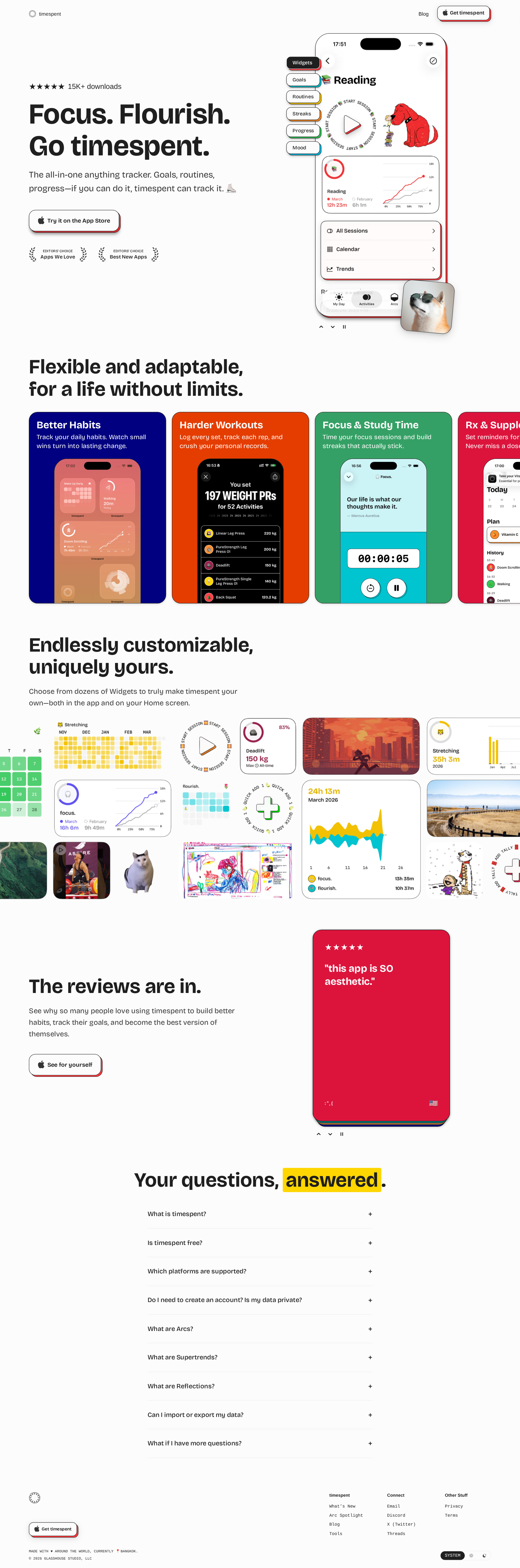
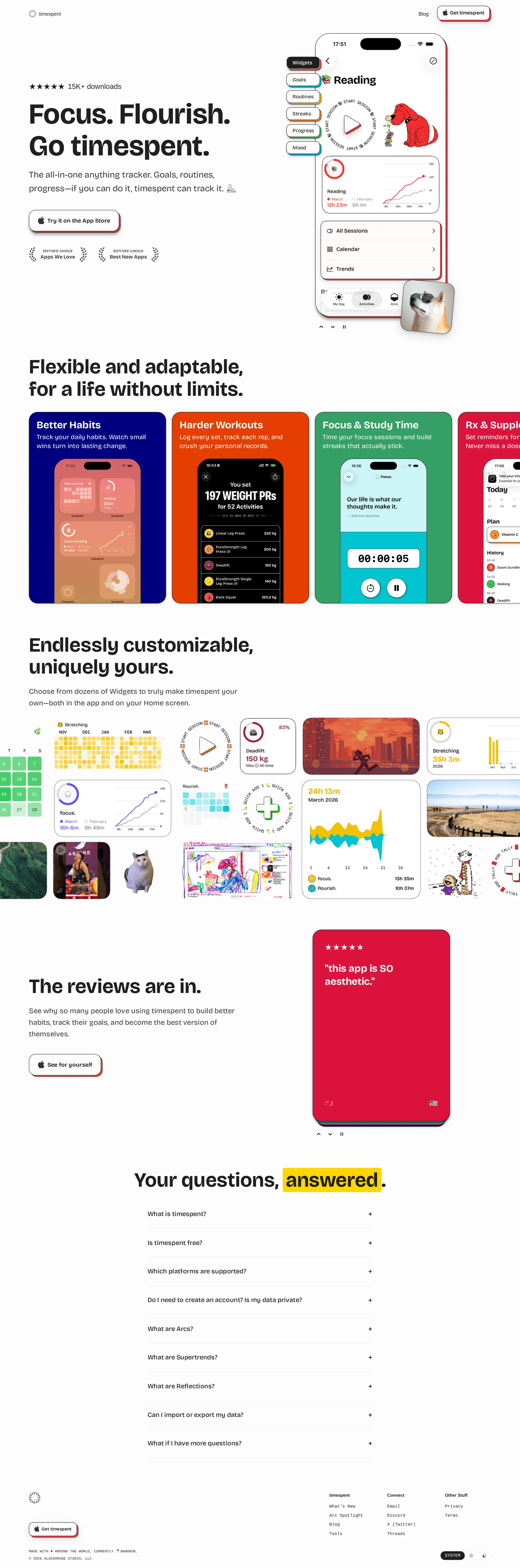
A highly coherent visual identity combines oversized typography, saturated app imagery, offset card construction, and generous white space. The interface feels crafted specifically for this product rather than assembled from generic SaaS patterns.
What works
- The hero establishes product, audience benefit, and download intent immediately.
- Real interface imagery does most of the persuasive work and remains visually legible at a glance.
- Colorful use-case cards create a memorable rhythm without overwhelming the overall page.
- The widget collage effectively demonstrates flexibility and customization.
Opportunities
- Reduce the visual density of the widget showcase for users who need a simpler feature summary.
- Ensure the colored card sequence does not make secondary use cases compete with the primary proposition.
- Use more consistent text contrast across saturated surfaces.
Uniqueness
The offset, print-like cards and expressive collage of app screens give the page a recognizable point of view. The visual language is more editorial and tactile than the typical productivity-app landing page.
What works
- The layered CTA and card treatments create a distinctive physicality.
- The use of varied app states and widgets communicates breadth without relying solely on abstract illustrations.
- The restrained page background makes the colorful product surfaces feel intentional.
Opportunities
- Clarify which visual motifs are core brand signatures and which are decorative as the product grows.
- Consider a more ownable explanatory device for the broad ‘track anything’ promise so the message is not carried only by examples.
User experience
The information architecture is understandable and the page supports both scanning and deeper investigation. The major friction is that several content areas appear to depend on horizontal or animated presentation, while the supplied audit documents contrast weaknesses.
What works
- The progression from promise to examples, customization, reviews, FAQs, and download is easy to follow.
- The use-case examples make an abstract tracker concept concrete.
- The FAQ section addresses practical adoption questions, including platform and privacy concerns.
- Hero controls provide an apparent alternative to passive animation.
Opportunities
- Add explicit visual cues that the use-case and showcase areas can be scrolled.
- Offer a non-animated or simplified fallback for users who do not benefit from motion-heavy previews.
- Increase the prominence and readability of supporting copy around the product screenshots.
- Test the page at mobile widths to ensure cropped cards do not hide essential labels or controls.
Conversion optimization
The landing page has a strong conversion foundation for an Apple-app download: the CTA is persistent, repeated, and paired with product evidence, awards, testimonials, and FAQs. Conversion could improve through tighter positioning and clearer reassurance near the first action.
What works
- The hero CTA is direct and visually prominent.
- Awards, download volume, reviews, and product screenshots provide several forms of social proof.
- The page answers likely objections through platform, account, pricing, and privacy-related FAQ content.
- Repeated download prompts appear at meaningful points in the journey.
Opportunities
- State the most important differentiator more explicitly before presenting the many possible tracking scenarios.
- Place concise pricing or trial context closer to the first download CTA if applicable.
- Pair the broad use-case section with a short explanation of who benefits most from timespent.
- Ensure the CTA remains equally legible across themes and colored backgrounds.
What we'd improve
- 01high
Repair contrast failures in colorful content cards
Audit every text pairing in the use-case and testimonial areas, especially the flagged low-contrast tiles and review card. Replace weak foreground colors or adjust panel surfaces while retaining the expressive palette.
- 02high
Make horizontal content discoverable
Add visible scroll cues, accessible carousel semantics, clear next and previous controls, and keyboard support to the use-case and widget presentation areas. Prevent essential content from appearing accidentally clipped.
- 03high
Validate motion and reduced-motion alternatives
Confirm that hero transitions, decorative movement, and carousel behavior respect the reduced-motion preference. Provide a stable still frame and preserve access to all showcased screens without animation.
- 04medium
Sharpen the first-screen positioning
Follow the broad ‘track anything’ promise with one concise statement about the primary audience or most valuable outcome, so visitors understand the product’s focus before scanning the many examples.
- 05medium
Improve screenshot comprehension
Increase or simplify supporting labels around dense app imagery, and verify that important interface details remain readable on small screens and at increased text sizes.
- 06low
Strengthen conversion reassurance
Bring the most decision-relevant information—platform availability, account requirements, privacy, and pricing or trial terms—closer to the hero CTA where possible.