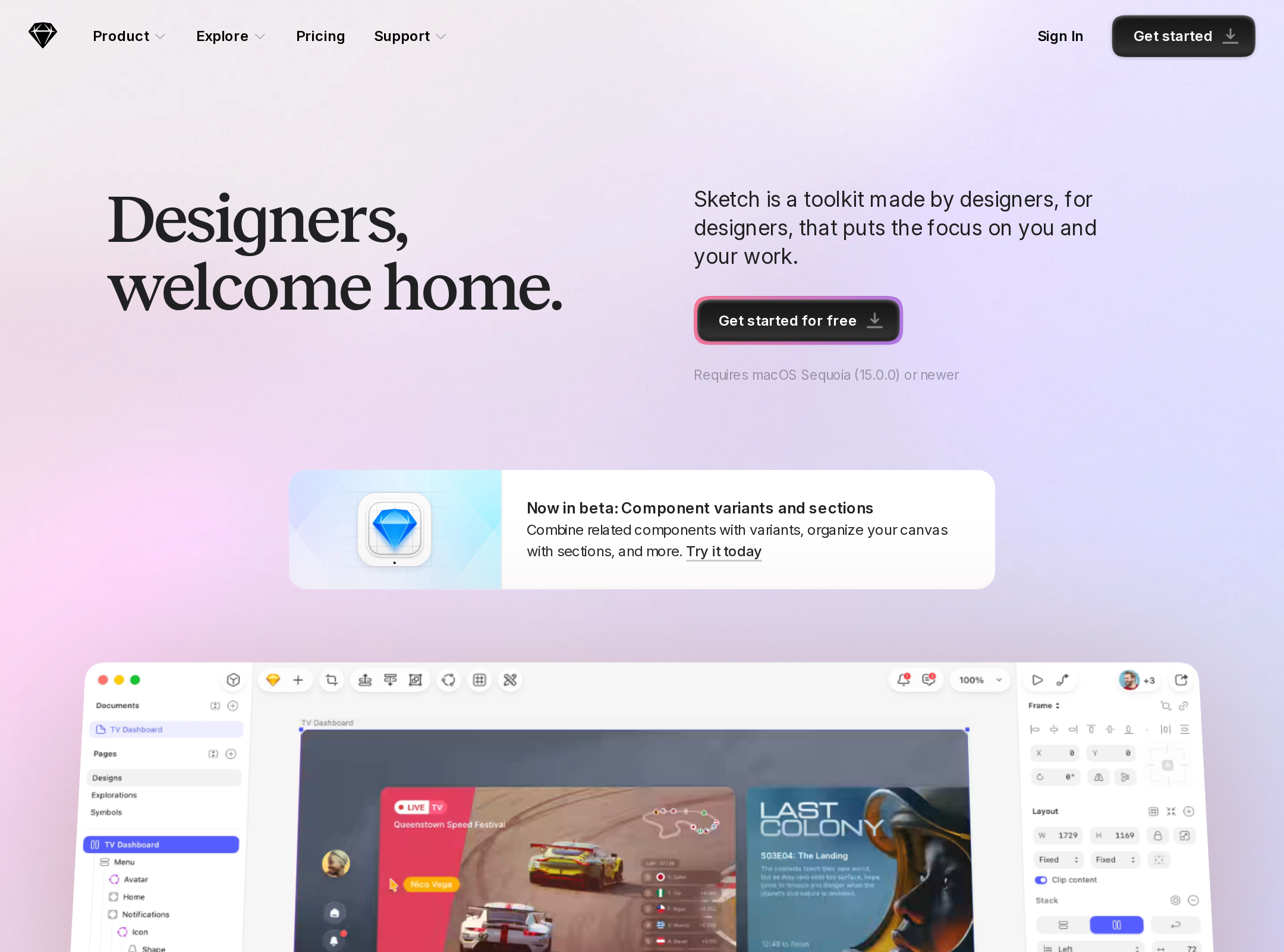


Sketch website analysis
A detailed critique of the homepage's craft, originality, usability, and ability to move visitors toward its intended goal.
Our observations
Visually excellent and highly suitable for a curated design gallery, but accessibility and implementation-quality findings warrant review before treating it as a best-practice reference.
Best practices
The page has strong semantic landmarks, one clear primary heading, visible navigation, repeated calls to action, and a coherent content hierarchy. Automated checks nevertheless report serious accessibility defects and structural inconsistencies.
What works
- A clear hero section communicates the product category and audience immediately.
- The page uses a single detected H1 and a main landmark, followed by logically grouped product chapters.
- Primary actions are repeated throughout the journey instead of being confined to the header.
- The footer provides substantial navigation and a newsletter form.
Opportunities
- Resolve 15 missing image alternative-text findings, including product media and testimonial imagery.
- Give five links accessible names; at least one large promotional link is detected as textless.
- Repair 54 duplicate-ID instances and the heading-level skip identified in the promotional area.
- Address 13 text-contrast failures, particularly in feature-card content and secondary copy.
Design
The visual system is exceptionally cohesive, expressive, and well matched to a design-tool brand. Product imagery, typography, color, and pacing work together to create a premium presentation.
What works
- The hero combines a memorable headline with a large, immediately legible product canvas.
- The serif display treatment creates a recognizable editorial voice without compromising the software-oriented interface language.
- Feature chapters use varied card compositions and color fields to avoid a repetitive product-tour feel.
- The composition maintains a disciplined visual rhythm across a very long page.
Opportunities
- Some feature cards become visually dense at the supplied viewport, so stronger internal prioritization could improve scanability.
- The many pastel surfaces and small labels occasionally compete with the primary message of each chapter.
- The final company and signup sections could use slightly stronger visual emphasis to match the impact of the hero and product canvas.
Uniqueness
Sketch distinguishes itself through an editorial, serif-led brand voice and an unusually soft, art-directed product presentation. Its product screenshots are integrated into the composition rather than presented as generic SaaS panels.
What works
- The contrast between literary display typography and interface-focused product imagery is distinctive.
- The pastel atmospheric treatment and colorful modular cards feel specific to a creative tool rather than a generic enterprise platform.
- The page turns product capabilities into a sequence of visual chapters with different compositional personalities.
Opportunities
- The rounded pills, gradient glows, testimonial carousel, and feature-card patterns are increasingly common in contemporary SaaS marketing.
- A more proprietary visual motif or stronger narrative device could make the experience even more immediately identifiable without relying on the logo.
User experience
The page offers a convincing guided tour for prospective designers, with strong visual proof and repeated opportunities to continue. Its length, carousel-like regions, and accessibility defects create friction for some users.
What works
- The ordering moves from product promise to interface proof, capability groups, social proof, company positioning, and conversion.
- Feature headings are benefit-oriented and easy to scan.
- The large product visuals help users understand the offering before reading every detail.
- The footer exposes broad navigation for users who want to explore specific capabilities.
Opportunities
- Provide clearer state and control labeling for testimonial and feature sliders; the supplied evidence confirms swiper regions but not their accessible interaction model.
- Ensure every image and decorative graphic has an intentional alternative-text strategy.
- Increase contrast for low-emphasis feature text and verify keyboard focus visibility across navigation, cards, sliders, and forms.
- Test the narrow layout with real content lengths; several screenshot panels appear horizontally cropped or partially revealed, which may be intentional carousel behavior but cannot be confirmed from one capture.
Conversion optimization
For a product-led design-tool homepage, conversion intent is clear and consistently supported by free-start CTAs, product proof, testimonials, and a newsletter form. The page could reduce decision friction by making the offer and next step more explicit earlier.
What works
- The hero includes a prominent free-start action and a supporting disclaimer.
- Calls to action recur after major capability chapters, aligning conversion opportunities with user interest.
- The product canvas and testimonials provide both functional proof and social validation.
- The closing CTA reinforces the product's central promise before the footer.
Opportunities
- Clarify the immediate commitment, such as plan availability or what happens after selecting the free-start action, near the hero.
- Differentiate exploration links from conversion CTAs more strongly so the repeated buttons do not feel interchangeable.
- Add concise proof points around team suitability, platform availability, or pricing expectations if those are important objections for new visitors.
- Ensure the newsletter form has a clearly visible purpose and accessible labels rather than relying on surrounding context.
What we'd improve
- 01high
Fix accessibility blockers before publication
Add meaningful alternative text or explicit decorative treatment for all 15 flagged images, provide accessible names for the five unnamed links, repair duplicate IDs, and correct the heading hierarchy.
- 02high
Raise feature-card contrast
Review the 13 reported contrast failures in the feature grids and sliders. Darken secondary text or adjust the card surfaces while preserving the pastel art direction.
- 03high
Make interactive regions self-describing
Audit testimonial and feature sliders for keyboard operation, visible focus, labeled previous/next controls, current-slide state, and a usable reduced-motion mode.
- 04medium
Strengthen the first conversion decision
Pair the hero CTA with a concise explanation of signup expectations, platform or plan context, and the next step so visitors can act without searching the page.
- 05medium
Reduce long-page cognitive load
Add stronger chapter summaries or lightweight navigation cues so users can move between design, prototyping, collaboration, and pricing content without scanning the entire page.
- 06low
Give the closing section more persuasive weight
Increase the distinction between the company story, final CTA, customer logos, and newsletter area so the end of the page feels like a deliberate conversion conclusion rather than a gradual fade into the footer.