sharelocal.dev website analysis
A detailed critique of the homepage's craft, originality, usability, and ability to move visitors toward its intended goal.
Our observations
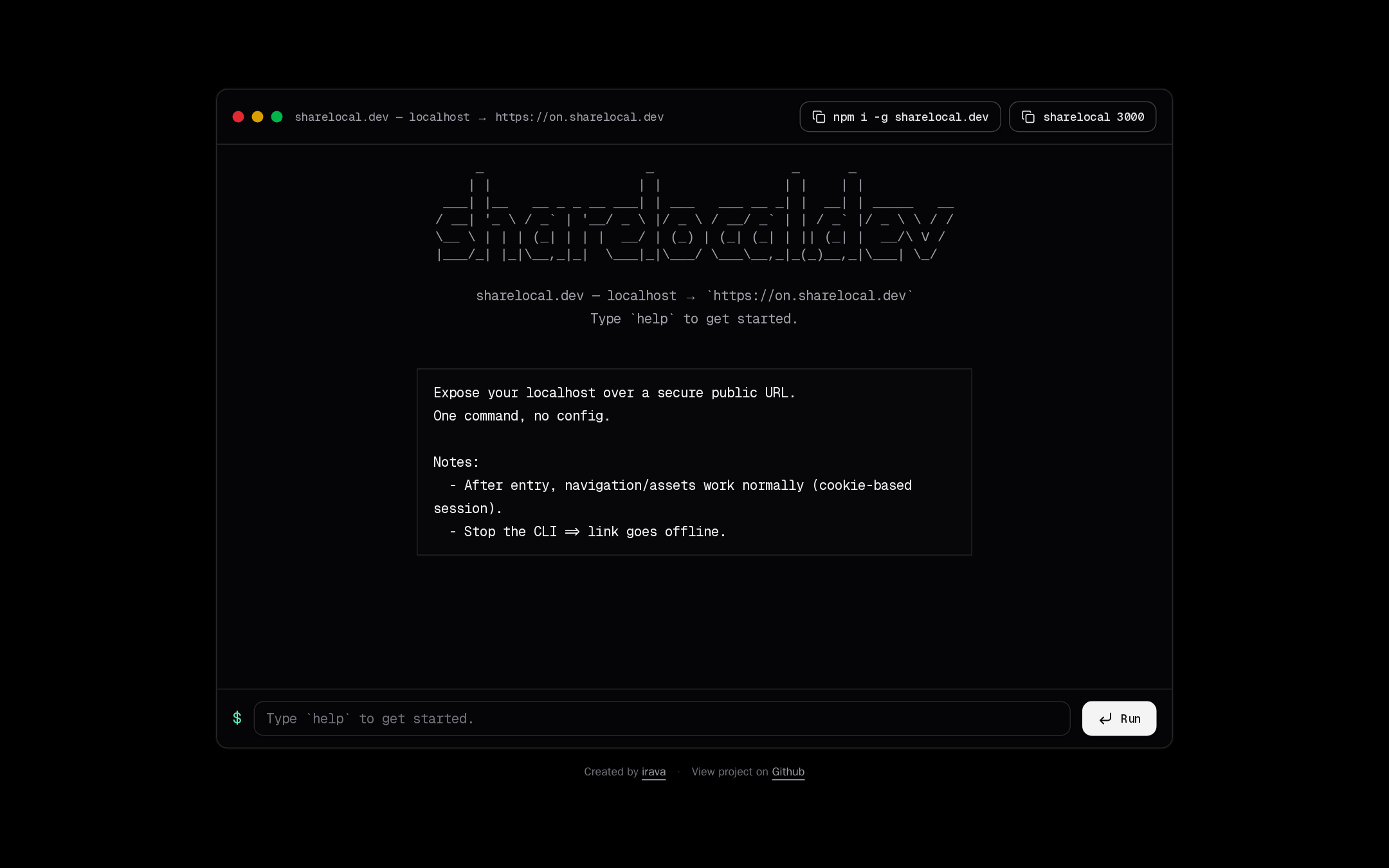
A highly coherent and memorable developer-tool homepage with a clear primary workflow. It is suitable for publication after addressing the unlabeled command field and semantic heading gap.
Best practices
The page is focused, uncluttered, and provides direct command-oriented interaction. The automated evidence reports no contrast failures, duplicate IDs, or heading skips, but it also identifies a missing form-control label and no h1.
What works
- Clear single-purpose structure centered on the product workflow.
- No detected contrast failures in the supplied automated samples.
- Interactive controls visibly communicate copy and run actions.
- Footer attribution and project access are present without competing with the main task.
Opportunities
- Add a visible or programmatically associated label for the command input.
- Provide a proper h1 so the page purpose is represented in the document structure.
- Verify keyboard focus visibility and focus order across copy buttons, input, and Run action.
- Test the dense console layout at mobile widths, especially the top command buttons and bottom form.
Design
The visual system is unusually consistent: terminal conventions, typography, framing, and copy all support the same product story. The design is intentionally sparse, though some layers are so subdued that the interface can feel flatter than necessary.
What works
- Strong thematic alignment between the tool’s purpose and its terminal-inspired presentation.
- Distinctive ASCII branding gives the otherwise minimal page a recognizable focal point.
- Effective use of a single large console to contain information and action.
- Restrained palette and spacing preserve attention on the command workflow.
Opportunities
- Introduce slightly clearer hierarchy between explanatory copy, notes, and interactive output.
- Give the active command area a stronger state distinction without abandoning the monochrome direction.
- Consider a concise secondary explanation for users unfamiliar with localhost tunneling.
Uniqueness
The terminal-window framing and ASCII identity create a clear point of view that is more specific than a generic dark SaaS landing page. The concept remains familiar to developer audiences, but the execution is cohesive and recognizable.
What works
- The ASCII wordmark and shell-style prompt establish a memorable visual signature.
- The page behaves visually like the product it describes rather than using unrelated promotional imagery.
- The minimal interface feels purpose-built for technical users.
Opportunities
- Develop one or two additional brand cues beyond terminal conventions to improve recognition outside developer circles.
- Use the product’s temporary-link concept as an opportunity for a subtle, original visual motif rather than relying solely on shell aesthetics.
User experience
The main task is easy to find: users can copy an install command, copy a run command, or enter a command directly in the console. The experience is efficient for technically experienced visitors, but the sparse onboarding and missing input label create avoidable barriers.
What works
- Primary actions are visible above the fold within a familiar interaction model.
- Copyable command examples reduce friction for setup.
- The explanatory notes clarify session behavior and what happens when the CLI stops.
- The centered composition minimizes navigation overhead.
Opportunities
- Label the command field with its purpose and include an accessible description of expected input.
- Make the initial next step more explicit for visitors who do not recognize the command examples.
- Provide clear success, error, and loading feedback for copy and Run interactions.
- Confirm that long command strings remain readable and operable without horizontal-layout failures on small screens.
Conversion optimization
For a developer utility whose conversion goal is first use, the page performs well by placing installation and execution commands directly in the main console. It is less effective at building confidence for new users because benefits, limits, and trust signals are brief.
What works
- The install command and example invocation are immediately available.
- The product promise is concise and directly connected to the visible workflow.
- The interactive terminal lowers the distance between discovery and trial.
Opportunities
- Add a short, prominent explanation of the core benefit before the command examples for first-time visitors.
- Clarify whether the service is free, requires an account, or has usage limits if applicable.
- Add lightweight trust or documentation links near the primary workflow without diluting the focused layout.
- Use explicit feedback after a command is copied or run so users know the action succeeded.
What we'd improve
- 01high
Label the command input accessibly
Associate the input with a visible label or equivalent accessible name that explains what command or value the user should enter. Preserve the terminal aesthetic while ensuring screen-reader users receive the same instruction.
- 02high
Restore a semantic page heading
Add one clear h1 describing sharelocal.dev and its core purpose. Keep the visual ASCII treatment if desired, but ensure the document structure exposes a meaningful heading.
- 03medium
Strengthen first-use guidance
Add a short supporting sentence that explains the expected sequence: install the CLI, start a local server, then expose its port. This would improve comprehension without adding a conventional marketing section.
- 04medium
Define interaction feedback
Make copy, command execution, errors, and offline tunnel states visibly understandable. The current screenshot communicates the idle state well, but supplied evidence does not establish feedback behavior.
- 05low
Validate narrow-screen behavior
Test the console at mobile widths, focusing on command buttons, long URLs, ASCII branding, horizontal overflow, and the bottom input/action row.