

Diffusion Studio website analysis
A detailed critique of the homepage's craft, originality, usability, and ability to move visitors toward its intended goal.
Our observations
A distinctive, polished AI-product marketing page with strong visual proof and a clear narrative. It merits inclusion, with accessibility labeling and small-scale legibility as the main areas for review.
Best practices
The page has a clear single-H1 structure, semantic navigation and footer, logical heading progression, repeated calls to action, and no reported sampled contrast failures or duplicate IDs. Accessibility inspection still identifies five unlabeled form controls, a serious issue requiring remediation.
What works
- One H1 is present, followed by an orderly H2/H3 hierarchy.
- Navigation, main content, footer, buttons, links, media, and FAQ structures are represented in the supplied evidence.
- The page uses repeated primary actions and clear section-level progression.
- The accessibility report found zero sampled contrast failures and zero duplicate IDs.
Opportunities
- Provide programmatic labels for all five reported unlabeled form controls.
- Audit the small text visible in the screenshot at mobile and desktop sizes, especially metadata, footer links, and FAQ controls.
- Provide meaningful alternative text or adjacent explanatory text for interface screenshots, video, canvas layers, and decorative motion.
- Verify keyboard focus visibility, disclosure semantics, video controls, and reduced-motion behavior; these are not established by the supplied evidence.
Design
The design is unusually cohesive for a developer-facing product page. It balances cinematic atmosphere with credible interface demonstrations and maintains a disciplined dark visual language across a long page.
What works
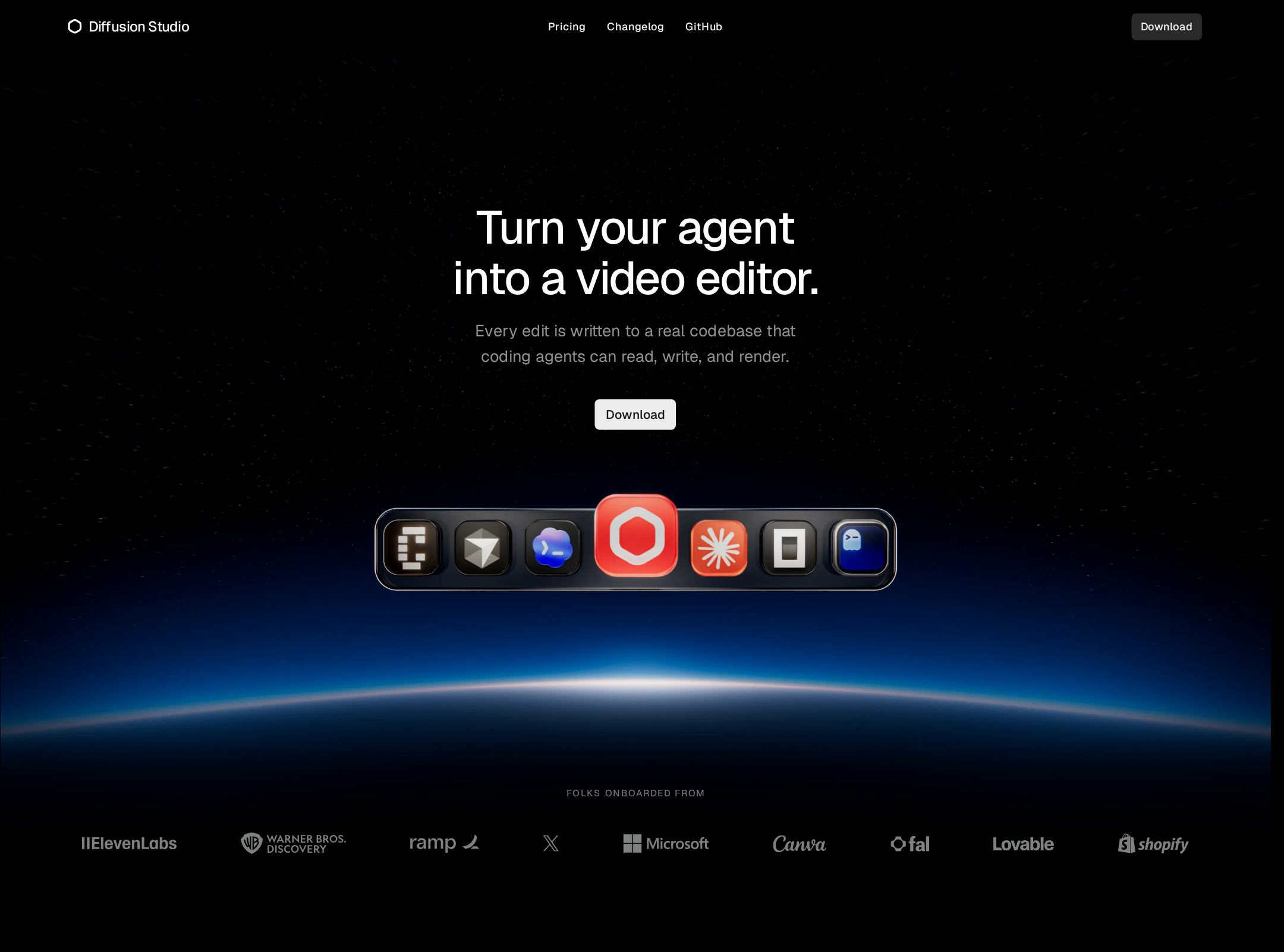
- The hero combines a concise positioning statement with a memorable horizon-and-product visual.
- Authentic editor, code, timeline, and desktop imagery makes the product promise tangible.
- The alternating media layouts prevent the long page from becoming a repetitive feature grid.
- Typography, compact controls, dark surfaces, and restrained radii create a consistent product identity.
Opportunities
- Increase the visual distinction between some dark sections so long-scroll landmarks are easier to scan.
- Give the most important proof points slightly more breathing room on narrow screens, where the supplied screenshot makes several text blocks appear very small.
- Consider a stronger visual summary of the agent workflow before the page reaches the detailed feature demonstrations.
Uniqueness
The combination of AI coding agents, an open video editor, and cinematic product presentation gives the page a clear point of view. Its strongest originality comes from connecting software-development conventions with creative-editing evidence.
What works
- The agent-to-video-editor positioning is specific rather than a generic AI productivity claim.
- Code snippets and editor footage support the same product story from different audiences' perspectives.
- The space-horizon art direction creates a recognizable launch-page atmosphere.
Opportunities
- Make the open-source and agent interoperability story even more visibly distinctive through a concise workflow diagram or compatibility matrix.
- Avoid allowing the atmospheric hero treatment to carry too much of the brand differentiation; the product's workflow model is the more durable differentiator.
User experience
The page supports a sensible discovery path from promise to proof to action, with strong visual demonstrations and an FAQ near the end. Long-scroll density, small text, and unresolved control labeling reduce confidence in the experience for all users.
What works
- The section order answers increasingly practical questions: what it is, how it works, what it can do, how fast it is, and where to get it.
- Large product media helps users understand an unfamiliar workflow without requiring a live demo.
- FAQ content and multiple download entry points support users who need more detail before acting.
Opportunities
- State platform support, installation expectations, and agent prerequisites closer to the first Download action.
- Add concise captions or zoomable views for dense editor and code imagery.
- Ensure FAQ rows expose their expanded state and remain comfortable to operate with keyboard and touch input.
- Test the full page at narrow widths and with animation disabled; those outcomes cannot be confirmed from the supplied evidence.
Conversion optimization
For a developer-oriented product launch page, conversion fundamentals are strong: the value proposition is prominent, Download is repeated, GitHub is surfaced, and the final CTA is supported by product proof. Conversion friction remains around audience qualification and installation clarity.
What works
- The hero places a direct Download action near the core promise.
- GitHub is paired with Download, matching the apparent open-source and developer-oriented audience.
- Product screenshots and performance claims appear before the closing CTA, supporting evaluation.
- The FAQ provides a late-stage objection-handling section.
Opportunities
- Clarify whether Download is the recommended path for every visitor or whether GitHub, agent setup, or documentation is the better first step for different audiences.
- Add operating-system and compatibility context adjacent to the first conversion point.
- Use more specific CTA supporting text, such as what happens after download or how quickly a user can begin an edit.
- Surface trust signals such as repository activity, supported agents, or example projects if available and verifiable.
What we'd improve
- 01high
Label every reported form control
Resolve the five form-control-missing-label findings with visible or programmatic labels, and verify accessible names for any custom selects, disclosures, or controls.
- 02high
Improve small-screen legibility
Review the smallest text, footer navigation, FAQ rows, and CTA supporting copy at mobile widths. Increase size or spacing where the screenshot suggests the content becomes difficult to scan.
- 03high
Clarify the first-download path
Place platform support, prerequisites, and the expected post-click experience next to the hero Download action so visitors can choose between Download, GitHub, and documentation with less uncertainty.
- 04medium
Add accessible media explanations
Pair video, canvas, code, and interface imagery with concise captions or equivalent text that explains the workflow rather than relying on visual inspection alone.
- 05medium
Verify motion alternatives
Test the hero video, reveal transitions, blurred overlays, and layered media with prefers-reduced-motion enabled; provide a stable poster or static presentation where necessary.
- 06low
Strengthen workflow differentiation
Add a compact visual explanation of how an agent analyzes footage, edits the project, and hands control back to the editor. This would make the core product model easier to understand before the detailed sections.