

Oxide Computer Company website analysis
A detailed critique of the homepage's craft, originality, usability, and ability to move visitors toward its intended goal.
Our observations
A distinctive and credible infrastructure marketing homepage with an unusually coherent technical art direction. It is publishable for a design gallery, while accessibility labeling, content density, and conversion clarity remain meaningful opportunities.
Best practices
The page demonstrates strong structural fundamentals and disciplined visual consistency, with one H1, no heading skips, a main landmark, and no sampled contrast failures. Automated accessibility evidence still identifies two serious missing-label issues on form controls.
What works
- Clear semantic heading hierarchy across the long-form narrative.
- Strong automated structural results: one H1, no heading skips, one main landmark, and zero sampled contrast failures.
- Consistent use of borders, spacing, typography, and status-oriented UI patterns.
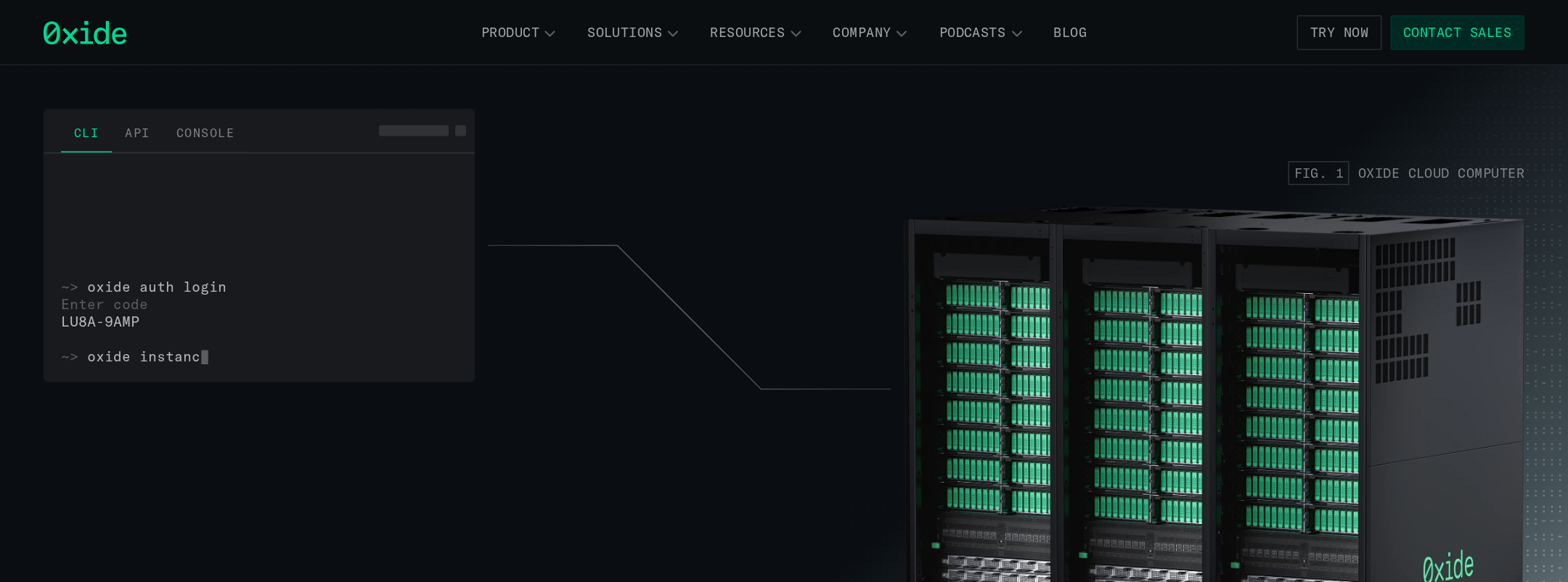
- Distinctive product evidence through hardware, diagrams, and interface visuals rather than generic imagery.
Opportunities
- Add programmatic labels or accessible names to both newsletter inputs.
- Verify keyboard focus visibility for navigation triggers, tabs, buttons, and form controls.
- Test the dense technical sections at mobile widths and with text zoom.
- Confirm that animated marquees and status motion respect prefers-reduced-motion settings.
Design
The visual system is exceptionally coherent: dark industrial surfaces, fluorescent operational accents, hardware photography, console UI, and diagrams all reinforce the same product story. The page feels designed for infrastructure professionals rather than adapted from a generic SaaS template.
What works
- Strong relationship between physical rack imagery and software interface visuals.
- Consistent dark palette with carefully controlled green emphasis.
- Technical graphics and interface fragments make abstract infrastructure benefits concrete.
- Typography creates a clear distinction between editorial messaging and system-oriented detail.
Opportunities
- Increase the scale or contrast of secondary explanatory text in the densest sections.
- Introduce occasional lighter visual pauses to reduce the cumulative darkness and information load.
- Make the primary commercial action more visually prominent within the long narrative.
Uniqueness
The homepage has a highly recognizable point of view. Its combination of on-premises hardware, operational console aesthetics, schematic diagrams, and public-cloud positioning is considerably more specific than common enterprise infrastructure marketing patterns.
What works
- Uses real product and system representations as the central art direction.
- The industrial-console visual language is consistent from hero through footer.
- The narrative connects hardware, software, operations, and governance rather than presenting isolated feature claims.
Opportunities
- Further distinguish the brand through a few signature explanatory diagrams or interaction moments that are unique to Oxide’s operating model.
- Reduce reliance on familiar terminal and dashboard conventions where they do not add explanatory value.
User experience
The information architecture supports a logical story from positioning to platform capabilities and workloads, but the page is long and visually dense. Visitors can understand the category and product ambition, though scanning and prioritization may be harder for less technical audiences.
What works
- The opening statement communicates the central on-premises/public-cloud proposition quickly.
- Section sequencing moves from broad positioning into platform components, governance benefits, and workloads.
- Feature groupings and workload cards provide multiple paths into the product story.
- Sticky navigation supports orientation on a lengthy page.
Opportunities
- Add stronger section wayfinding or a compact in-page overview for users who want to scan.
- Clarify which audience or deployment stage each major section serves.
- Provide more whitespace or shorter supporting copy around dense diagrams and UI screenshots.
- Validate mobile layouts, especially the hero rack imagery, technical charts, and multi-column cards.
Conversion optimization
The page is persuasive as a category and product education experience, but its conversion path is comparatively understated. The visible evidence supports newsletter capture and exploratory navigation, while the strongest next step for a prospective enterprise buyer is not consistently emphasized.
What works
- The value proposition is specific and differentiated rather than generic.
- Product capabilities, governance benefits, and workload examples provide useful qualification context.
- The page includes update/news capture and navigation paths for product exploration.
- Operational visuals can build trust with a technically sophisticated audience.
Opportunities
- Promote one primary action—such as requesting a conversation, exploring availability, or evaluating the platform—more consistently across the page.
- Place a concise buyer-oriented proof point near the hero, such as deployment context, customer evidence, or an evaluation path, if available.
- Add clearer expectations beside forms, including what users receive and whether the submission is for updates or sales contact.
- Ensure every form input has a visible or programmatic label and that error/success states are announced accessibly.
What we'd improve
- 01high
Label both form controls
Add visible labels or reliable accessible names to the two inputs identified by the accessibility scan, and verify their association, placeholder behavior, validation, and error announcements.
- 02high
Strengthen the primary conversion path
Choose one dominant next step for qualified infrastructure buyers and repeat it at strategic points, especially near the hero, after the value-proposition section, and near the footer.
- 03medium
Improve long-page scanning
Add a compact contents or section-navigation pattern and use more explicit section summaries so visitors can move between platform, governance, product, and workload content.
- 04medium
Audit responsive technical content
Review the hero, charts, dashboard screenshots, diagrams, and multi-column cards at narrow widths and increased text sizes; preserve legibility without forcing horizontal scrolling.
- 05low
Verify motion preferences
Test the marquee, gentle-ping behavior, and transitions with reduced-motion preferences enabled, and provide static alternatives where motion communicates operational status.