How Many Plants website analysis
A detailed critique of the homepage's craft, originality, usability, and ability to move visitors toward its intended goal.
Our observations
A highly distinctive and visually coherent plant-resource homepage with strong editorial character. It is suitable for a curated design gallery, with accessibility and hierarchy refinements recommended before treating it as a best-practice reference.
Best practices
The page has clear content groupings, strong contrast sampling, and recognizable navigation and footer regions, but its document structure and form labeling need attention.
What works
- Contrast testing reported no failures across 28 sampled combinations.
- The page provides several clear content destinations, including Plant Guides, Plant Care, and The Dirt.
- The footer groups newsletter, exploration, social, and contact information into understandable areas.
Opportunities
- Reduce the four detected H1 elements to one page-level heading with subordinate section headings.
- Add the missing document language and main landmark.
- Provide accessible labels or explicit names for both email-form controls.
- Review the heading sequence so footer headings do not follow a skipped level.
Design
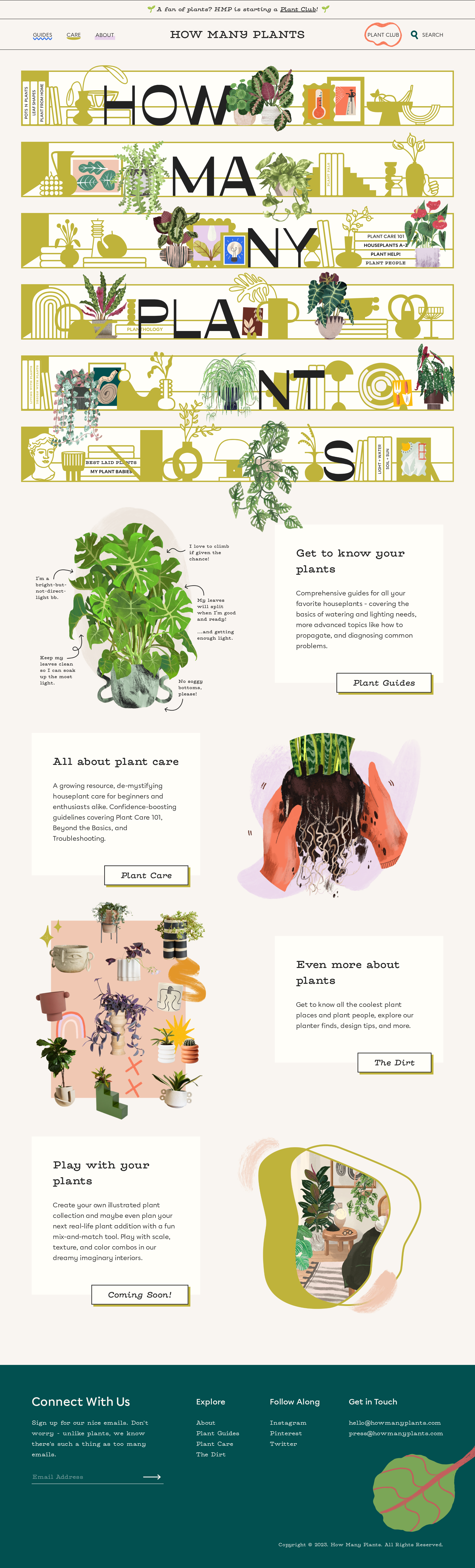
The homepage demonstrates exceptional consistency between its botanical subject matter and its visual system, with a memorable collage-based identity and carefully repeated editorial motifs.
What works
- The illustrated masthead immediately communicates the plant-focused subject and gives the page a strong signature.
- Alternating image-and-text sections create rhythm without relying on generic card grids.
- The warm paper palette, olive framing, typewriter display treatment, and botanical imagery form a coherent art direction.
- The footer's dark teal field provides a decisive visual conclusion.
Opportunities
- The opening artwork occupies substantial attention before the page explains the site's practical benefit; a concise supporting statement could improve orientation.
- Some decorative imagery is visually dense, so key labels and calls to action should remain especially prominent at smaller sizes.
Uniqueness
The page is unusually recognizable and avoids the interchangeable appearance common to content-resource homepages.
What works
- The oversized illustrated wordmark and layered plant collages create a clear visual signature.
- The combination of botanical diagrams, domestic objects, and literary typography feels authored rather than template-driven.
- The visual system extends consistently from masthead to content modules and footer.
Opportunities
- Future pages should retain the collage vocabulary while varying composition enough to prevent repeated hero treatment from becoming formulaic.
- Interactive or community features should receive equally distinctive but restrained visual treatments so they do not feel appended to the editorial system.
User experience
The content architecture is understandable once visitors reach the modular sections, but the very visual opening and structural accessibility findings create orientation and usability risk.
What works
- The four primary themes are presented as discrete, scannable modules with descriptive supporting copy.
- Alternating layouts encourage continued scrolling and make the long page feel paced rather than monotonous.
- The visible navigation remains compact and provides routes to guides, care, and about content.
Opportunities
- Add a concise introductory value proposition near the top so visitors understand what the resource offers before scanning the artwork.
- Ensure artwork does not compete with or obscure text at narrow widths, particularly where absolute positioning is used.
- Improve keyboard naming and focus treatment for the newsletter controls and search affordance.
- Use a more semantic heading and landmark structure to improve navigation for assistive-technology users.
Conversion optimization
For an educational resource and community homepage, the page offers several useful routes and a newsletter invitation, but the primary next step is not strongly prioritized.
What works
- The content cards connect visitors to concrete destinations rather than presenting only brand messaging.
- The newsletter invitation supports an ongoing relationship with plant-resource visitors.
- The plant-club announcement creates a timely community-oriented entry point.
Opportunities
- Choose and foreground one primary action, such as starting with a plant guide or joining the plant club, instead of distributing emphasis across several equal modules.
- Make the newsletter benefit more specific and visible before the form, such as describing the frequency or type of updates.
- Clarify the status and expected availability of the Coming Soon feature so it does not appear equivalent to active resources.
- Give the search control a more explicit accessible and visual label for visitors seeking a specific plant quickly.
What we'd improve
- 01high
Repair semantic structure and form accessibility
Create one page-level H1, correct the heading sequence, add a main landmark and lang attribute, and provide explicit accessible labels and names for the email input and submit control.
- 02high
Add a clearer top-of-page explanation
Place a short, benefit-led introduction adjacent to or immediately below the masthead that explains how the site helps plant parents and points to the most useful first action.
- 03medium
Establish a primary homepage action
Select one preferred path—such as Plant Guides, Plant Care, or Plant Club—and give it stronger visual and editorial priority while retaining the supporting destinations.
- 04medium
Test the collage layout at narrow widths
Verify that absolutely positioned illustrations, oversized lettering, text panels, and footer columns preserve readable ordering, adequate tap targets, and unobstructed controls across responsive breakpoints.
- 05low
Strengthen newsletter reassurance
Add concise, visible context about newsletter content and cadence, then retain the minimal form styling with a clearly labeled field and submit action.