GRAS website analysis
A detailed critique of the homepage's craft, originality, usability, and ability to move visitors toward its intended goal.
Our observations
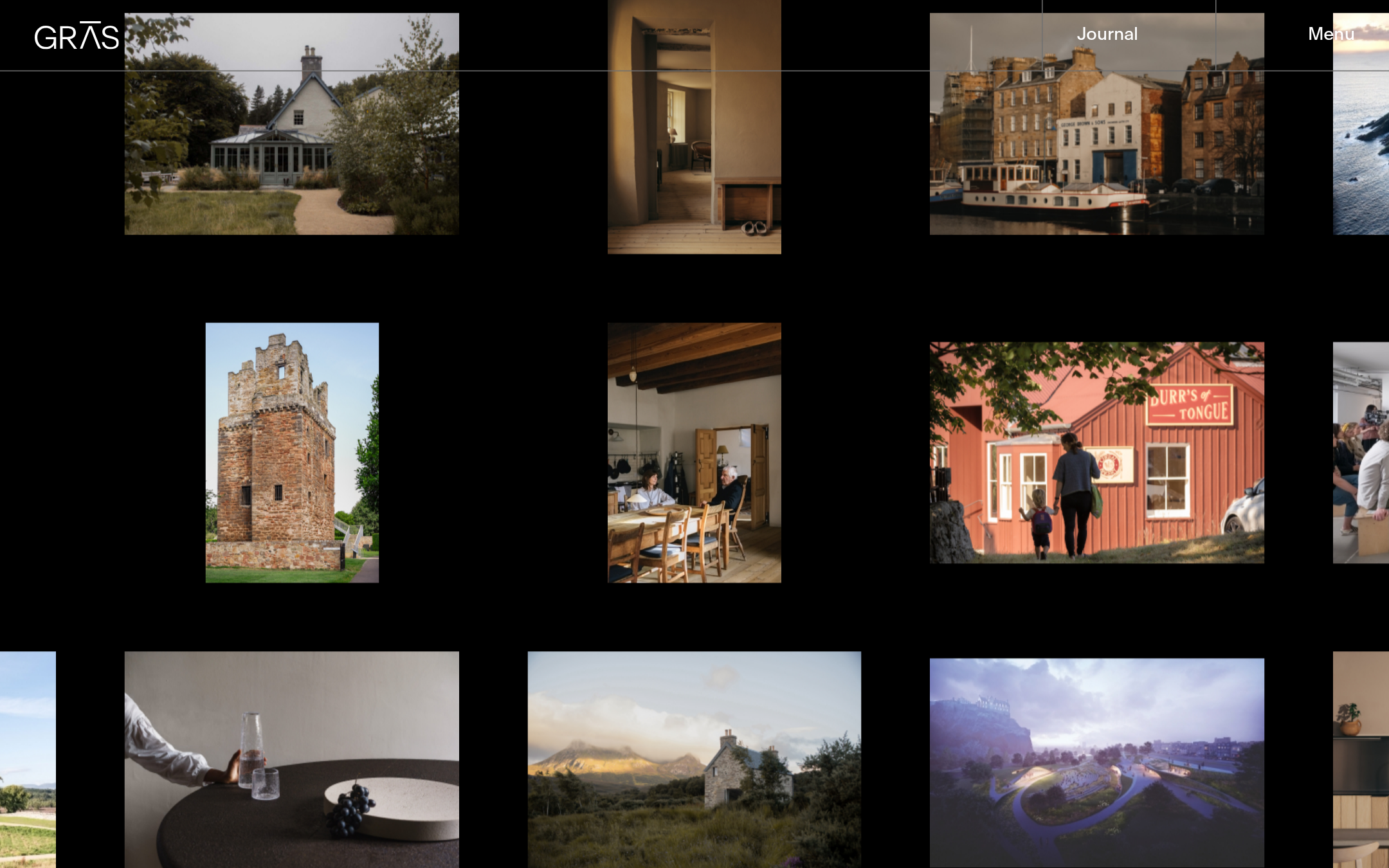
A visually distinctive and commercially credible architecture portfolio with strong editorial art direction. It is suitable for a curated gallery, but accessibility and semantic hierarchy issues prevent an exceptional rating.
Best practices
The page has a clear portfolio purpose, restrained visual language, and strong project imagery. Structural and accessibility evidence introduces meaningful reservations.
What works
- The portfolio purpose is immediately communicated through a substantial collection of project imagery.
- The fixed header keeps primary navigation available while preserving a largely unobstructed visual field.
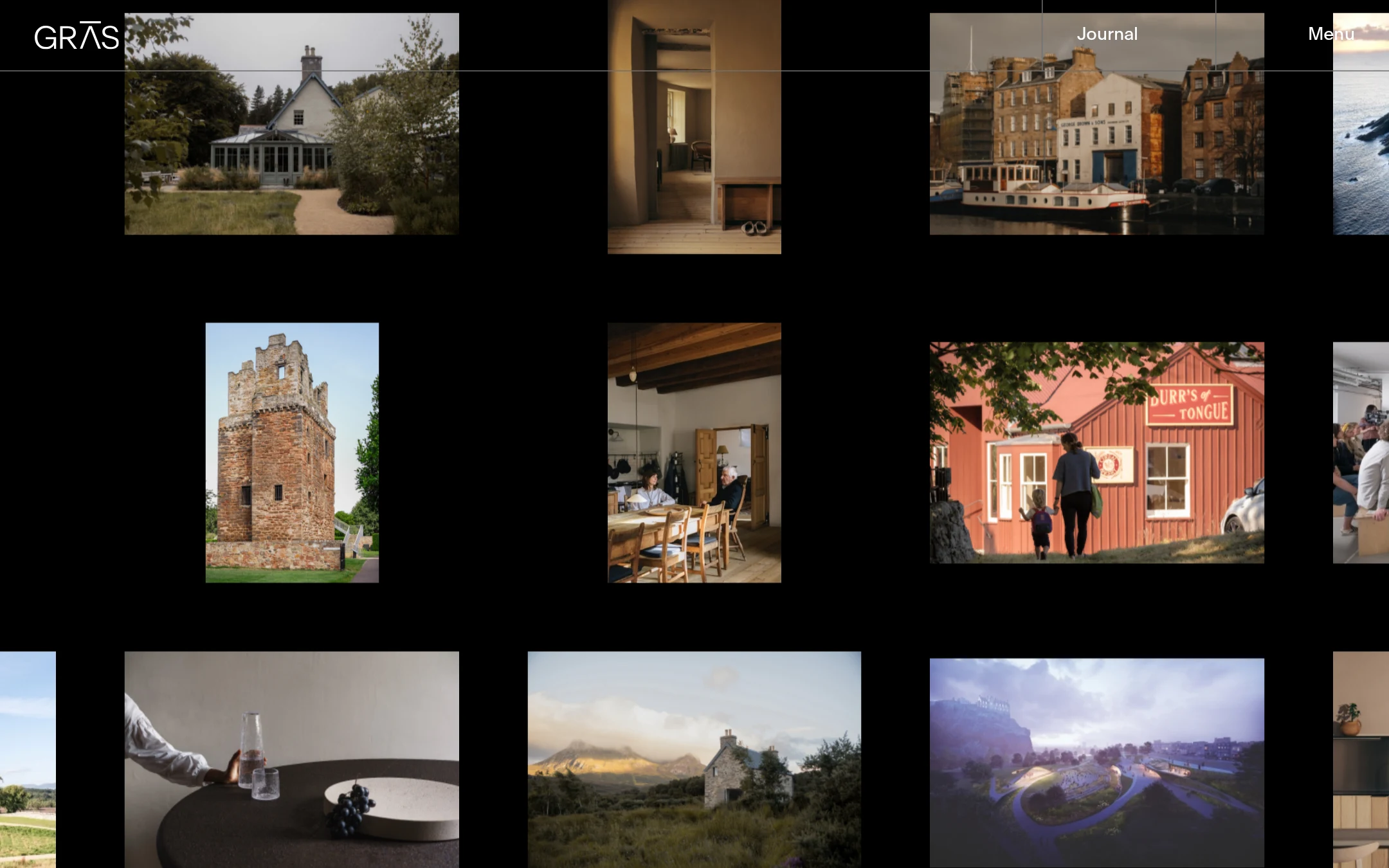
- The image grid accommodates varied aspect ratios without forcing every project into identical cards.
- The interface avoids unnecessary decoration, excessive copy, and competing calls to action.
Opportunities
- Add a visible, semantically correct H1 that identifies the studio and page purpose.
- Repair the unnamed link detected in the header and audit accessible names for icon or logo controls.
- Resolve the 13 detected contrast failures, especially muted grey text and drawer controls.
- Confirm focus states, keyboard access, drawer semantics, and narrow-screen behavior manually.
Design
A highly resolved visual concept whose restraint, imagery, and spatial rhythm create a memorable architecture-studio presence.
What works
- The black field creates strong contrast with the photography and gives the work an exhibition-like quality.
- Varied image proportions produce visual rhythm and make the grid feel curated rather than templated.
- The photographic selection balances finished architecture, interiors, landscape, and lived experience.
- Typography and controls remain quiet enough to support the work instead of competing with it.
Opportunities
- Introduce a small amount of contextual framing—such as a studio statement or project metadata—without diluting the image-led approach.
- Make the project ordering or grouping more legible for visitors who do not already understand the studio’s practice.
- Ensure overlay titles and navigation remain readable over all image and background conditions.
Uniqueness
The asymmetrical gallery treatment and unusually restrained black canvas give the homepage a recognizable editorial character within architecture portfolios.
What works
- The composition feels authored through spacing, cropping, and image sequencing rather than relying on generic card patterns.
- The combination of documentary imagery and architectural presentation conveys a broader practice than a conventional project index.
- The journal drawer adds an editorial dimension beyond a simple project archive.
Opportunities
- Develop a more ownable device for identifying GRAS projects or practice themes beyond the grid arrangement.
- Use project labels, dates, locations, or categories selectively to make the curatorial logic more apparent.
User experience
Browsing is visually engaging, but discoverability and semantic clarity are weaker than the art direction.
What works
- Menu and Journal controls are consistently placed in the fixed header.
- Large, separated images support visual scanning and make individual projects easy to distinguish.
- The sparse interface reduces cognitive load for visitors primarily interested in seeing the work.
Opportunities
- Provide an explicit page introduction so visitors understand the studio, location, and services without relying only on metadata or imagery.
- Improve the semantic heading structure; the supplied evidence reports zero H1 elements.
- Strengthen muted text contrast and provide robust focus and hover states for all interactive elements.
- Test the irregular layout with keyboard navigation, screen readers, zoom, and mobile widths.
Conversion optimization
For an architecture studio, the work itself is an effective credibility mechanism, but the homepage offers limited explicit guidance toward inquiry or contact.
What works
- The volume and quality of project imagery can establish credibility quickly for visually oriented prospective clients or collaborators.
- The Journal control supports deeper engagement with the studio’s thinking and updates.
- The unobtrusive presentation is appropriate for a design-led practice that wants the work to lead.
Opportunities
- Add a persistent or clearly discoverable route to contact, commissions, or studio information.
- Pair selected projects with concise descriptions of scope, location, or role to help prospective clients assess relevance.
- Use a brief studio proposition near the beginning of the experience so visitors can understand the practice before browsing deeply.
What we'd improve
- 01high
Establish semantic hierarchy and an explicit studio introduction
Add one visible H1 and a concise introductory statement identifying GRAS, its Edinburgh base, and its architecture and design practice. Preserve the minimal visual treatment while giving screen-reader and first-time visitors a clear orientation.
- 02high
Resolve contrast and control naming issues
Increase contrast for the grey drawer text and controls, and provide an accessible name for the unnamed header link. Verify Menu, Journal, Close, logo, and project links with keyboard and assistive-technology testing.
- 03medium
Make project context easier to understand
Add concise, consistently placed project titles and selected metadata such as location, typology, or year. Keep the imagery dominant, but make the portfolio useful to visitors evaluating the studio’s experience.
- 04medium
Improve inquiry discoverability
Expose a clear Contact or Work With Us route in the header, menu, or end-of-grid experience. A quiet text link would fit the existing art direction without introducing a conventional promotional button.
- 05low
Validate responsive and reduced-motion behavior
Test the irregular grid, drawer, image loading, focus order, and hover-title behavior at mobile widths, zoom levels, and reduced-motion settings. Adjust transitions and overflow where they hinder orientation or access.