Camille Mormal — Independent Designer & Art Director website analysis
A detailed critique of the homepage's craft, originality, usability, and ability to move visitors toward its intended goal.
Our observations
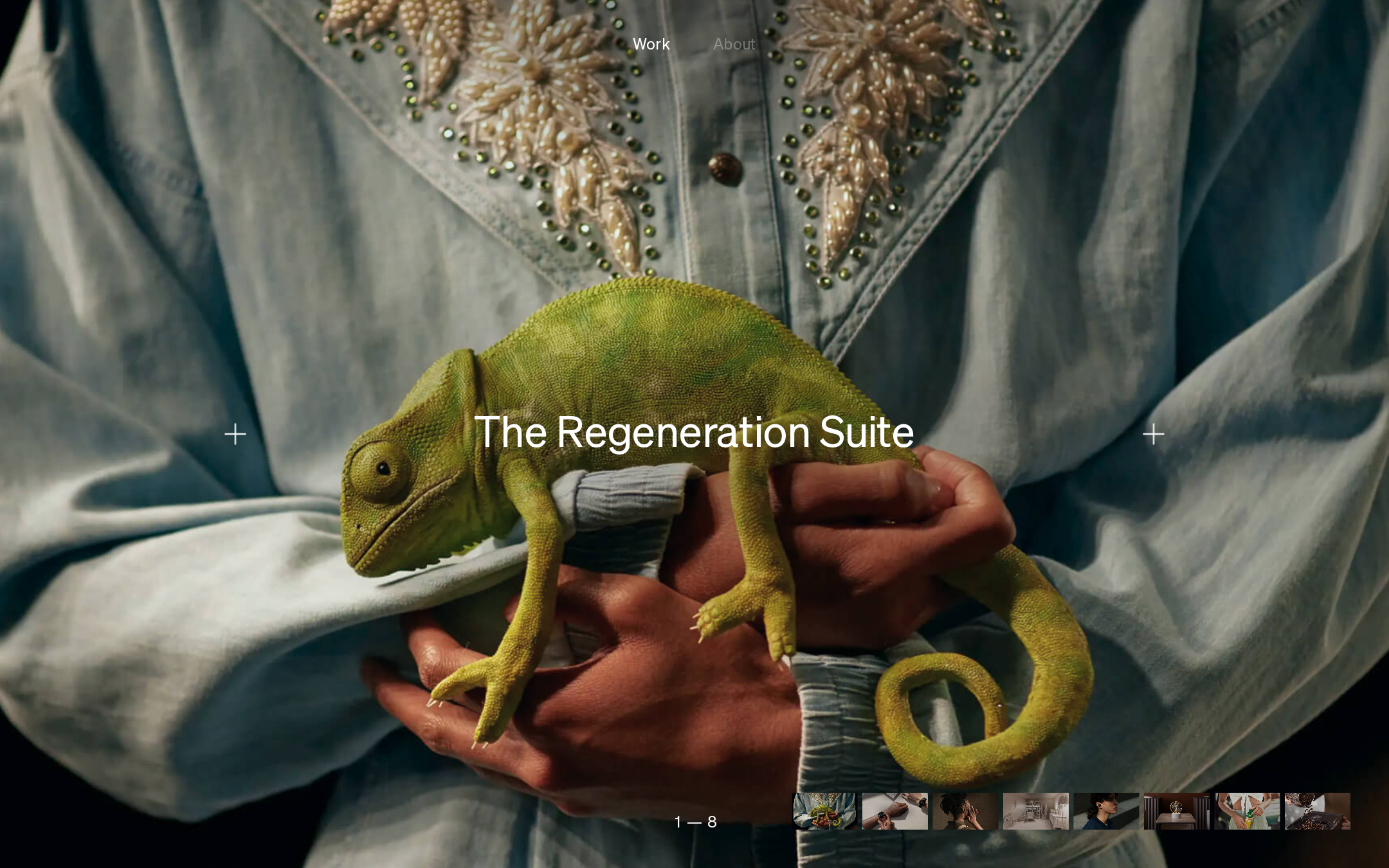
An exceptional visual portfolio homepage with a distinctive editorial mood and strong art direction. It merits inclusion for craft and originality, with semantic structure, explanatory content, and broader interaction clarity as the main opportunities.
Best practices
Strong visual hierarchy, focused navigation, and clean automated contrast results are offset by a missing h1 and limited visible context about the person or practice.
What works
- A single primary visual focus makes the page immediately legible as a portfolio showcase.
- The navigation is concise and consistently placed.
- Automated checks report no sampled contrast failures, no duplicate IDs, one main landmark, and no heading skips.
- The interface avoids unnecessary borders, shadows, and decorative controls.
Opportunities
- Add a properly marked-up primary heading that identifies the portfolio or individual while preserving the visual composition.
- Provide more visible orientation around the designer, discipline, and next action for visitors who arrive without prior context.
- Validate contrast and control visibility across the full set of project imagery rather than relying on the supplied sample alone.
Design
The page demonstrates unusually confident art direction, using a compelling image, quiet typography, and precise spatial restraint to create a memorable first impression.
What works
- The full-viewport image gives the work immediate prominence and emotional specificity.
- Centered titling creates a clear focal relationship between the artwork and its label.
- The thumbnail strip adds a compact editorial index without turning the page into a conventional card grid.
- The limited palette and lightweight type treatment produce a coherent gallery atmosphere.
Opportunities
- Ensure the overlay treatment remains readable when project imagery has brighter or busier areas.
- Consider a small, visually subordinate identity or practice statement so the composition communicates authorship as well as taste.
Uniqueness
The combination of cinematic imagery, sparse controls, and gallery-style browsing feels more authored than a standard portfolio template, although the broad full-screen showcase pattern is established in contemporary creative portfolios.
What works
- The artwork-first presentation gives the homepage a strong point of view.
- The visual index and side controls create a recognizable browsing language without heavy interface chrome.
- The composition feels intentionally curated rather than content-dense or template-led.
Opportunities
- A distinctive supporting layer—such as process, role, or project context—could make the experience more ownable beyond the opening visual treatment.
- Make the designer’s point of view more explicit through concise editorial framing rather than relying solely on image selection.
User experience
The visible interaction model is compact and potentially intuitive for visual browsing, but sparse labeling and limited contextual content may make the page less efficient for visitors evaluating fit or looking for contact information.
What works
- The current project and available project thumbnails are visually apparent.
- Large project labels are easy to locate and establish a clear browsing target.
- The restrained interface reduces cognitive load for image-led exploration.
Opportunities
- Clarify the purpose of the side controls and thumbnail items with accessible names and focus states.
- Expose or link to biography, capabilities, project details, and contact information without forcing users to infer the site structure.
- Test keyboard navigation, touch targets, focus visibility, and reduced-motion behavior; the supplied metadata does not establish these outcomes.
- Confirm that the title, thumbnails, and controls remain usable at mobile widths and with cropped imagery.
Conversion optimization
For a visual portfolio, the homepage succeeds at creating desire to explore. It is less optimized for turning that interest into a clear inquiry because the supplied view emphasizes work over qualifications and contact pathways.
What works
- The opening image communicates a high level of creative ambition immediately.
- Project navigation encourages deeper portfolio exploration.
- A strong first impression is appropriate for an independent designer and art director seeking visually aligned clients.
Opportunities
- Add a clear but understated contact or availability path near the primary navigation or at the end of the browsing flow.
- Pair project titles with concise role, outcome, or discipline cues so prospective clients can assess relevance quickly.
- Include a short positioning statement and selected client or collaboration context where appropriate.
- Measure progression from homepage to project detail and contact; no analytics or user-testing evidence was supplied.
What we'd improve
- 01high
Restore a semantic primary heading
Add one meaningful h1 that identifies the portfolio or practice, then visually integrate it into the existing overlay hierarchy so the page retains its minimal presentation while improving document structure and assistive-technology orientation.
- 02high
Make the inquiry path unmistakable
Provide a persistent or clearly discoverable contact route, with a short invitation appropriate to an independent creative practice. Keep it visually quiet, but do not require visitors to infer where to start a conversation.
- 03high
Test overlay readability across every project
Review title, navigation, pagination, and thumbnail controls against light, dark, detailed, and low-contrast imagery. Add adaptive treatments where needed and verify keyboard focus visibility.
- 04medium
Add concise professional context
Introduce a compact statement covering discipline, capabilities, and role so the homepage communicates authorship and commercial relevance alongside visual taste.
- 05medium
Audit mobile and reduced-motion states
Validate image cropping, title wrapping, thumbnail access, touch target sizing, focus order, and reduced-motion behavior at narrow viewports. The supplied evidence does not confirm these states.