Printery website analysis
A detailed critique of the homepage's craft, originality, usability, and ability to move visitors toward its intended goal.
Our observations
A distinctive and well-structured editorial SaaS homepage that is close to exceptional visually, but materially held back by contrast problems in secondary content and the lack of verified responsive evidence.
Best practices
The page has a single clear heading, logical heading progression, semantic navigation and footer regions, a skip link, descriptive product imagery, and a visible primary action. Automated accessibility data reports an overall score of 80, but also identifies 22 serious text-contrast failures.
What works
- Clear top-level proposition and one detected H1.
- Heading levels progress without detected skips.
- Semantic navigation, main content, and footer regions are present.
- The hero includes a prominent primary action and a lower-commitment template path.
Opportunities
- Resolve the 22 reported contrast failures, especially muted labels, card numbers, and secondary feature text.
- Verify keyboard focus visibility for navigation, tabs, expandable FAQ items, and language controls.
- Test the full layout at mobile widths; the supplied evidence only confirms a wide desktop composition.
- Review small 10–13px metadata and label text for legibility and zoom behavior.
Design
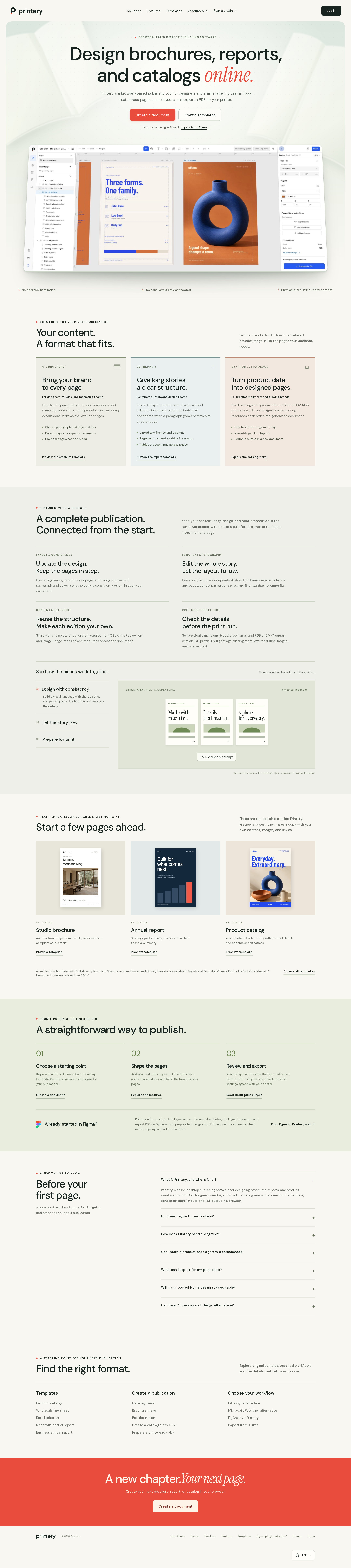
The visual system is highly coherent and well matched to a print-publishing product. Editorial typography, paper-like surfaces, restrained rules, and product imagery create a confident studio character.
What works
- Strong connection between visual style and the product’s publishing purpose.
- Effective contrast between utilitarian sans-serif copy and selective serif emphasis.
- Consistent palette with useful variation across use-case cards and content sections.
- Product screenshots and template previews make the abstract workflow tangible.
Opportunities
- Reduce the cumulative length or add stronger wayfinding so the page feels less exhaustive.
- Increase visual distinction between some lower-priority sections that currently share similar pale backgrounds.
- Ensure decorative labels do not carry essential meaning when their contrast is reduced.
Uniqueness
The homepage stands apart from generic SaaS templates through its editorial art direction and emphasis on documents, page systems, and print preparation. Its originality is strongest in the combination of publishing cues and restrained software UI presentation.
What works
- A credible print-studio mood rather than a generic productivity aesthetic.
- The product is framed through real publication formats and page workflows.
- Muted botanical neutrals paired with coral provide a recognizable visual signature.
Opportunities
- Add one or two more distinctive proof points about Printery’s technical advantage to complement the strong art direction.
- Use a more product-specific interactive demonstration or before-and-after example to deepen differentiation.
User experience
The page provides a clear narrative: understand the product, see supported publication types, inspect the workflow, browse templates, then start. The principal UX risk is information volume combined with faint secondary text.
What works
- The hero communicates the core category immediately through both copy and an editor preview.
- Use cases are separated into three understandable publication formats.
- Workflow features are organized around concrete publishing tasks.
- Templates and onboarding options support different entry points.
Opportunities
- Make the preferred first action more explicit for visitors who are unsure whether to start from a template, create a document, or import from Figma.
- Add persistent or repeated wayfinding on the long page.
- Improve the visual prominence of explanatory copy that currently depends on low-contrast styling.
- Confirm that the tabbed workflow content remains understandable without relying on visual state alone.
Conversion optimization
Conversion is well supported for a self-serve design tool: the main CTA appears in the hero, templates provide a lower-friction entry point, and the closing banner repeats the invitation. The page would benefit from more concrete decision support before the final action.
What works
- Primary and secondary actions are both visible above the fold.
- Template previews reduce the blank-canvas problem.
- The use-case structure helps visitors self-identify with a relevant outcome.
- The closing CTA provides a clear end-of-page conversion point.
Opportunities
- Clarify what happens after selecting the primary action, including account, pricing, or trial expectations if applicable.
- Add concise proof such as customer examples, export guarantees, or supported print workflows where available.
- Consider a compact sticky or repeated CTA for visitors who continue through the long page.
- Differentiate the Figma-import route from the native document-creation route more strongly.
What we'd improve
- 01high
Fix secondary text contrast
Address all 22 automated contrast failures, prioritizing feature labels, use-case numbers, muted supporting copy, and any text placed on pale card surfaces. Recheck normal, hover, focus, and disabled states after adjustment.
- 02high
Validate responsive and keyboard behavior
Review the navigation, workflow tabs, template cards, FAQ disclosures, language picker, and CTA controls at narrow widths and with keyboard navigation. The supplied evidence does not verify these states.
- 03medium
Strengthen first-action clarity
Explain the distinction between creating a new document, browsing a template, and continuing from Figma directly beside the hero actions or in the first onboarding section.
- 04medium
Reduce long-page friction
Add stronger section wayfinding or a compact persistent action so visitors can move between features, templates, FAQs, and the start flow without relying entirely on scrolling.
- 05low
Add decision-making proof
Introduce concise evidence about export quality, print preparation, collaboration, or customer outcomes to support the product claims without interrupting the editorial presentation.